Prices Calculation
In this guide, you'll learn how prices are calculated when you use the calculatePrices method of the Pricing Module's main service.
calculatePrices Method#
The calculatePrices method accepts the ID of one or more price sets and a context as parameters.
It returns a price object with the best-matching price for each price set.
The calculatePrices method is useful for retrieving the prices of a product variant or a shipping option that matches a specific context, such as a currency code, in your backend customizations.
Calculation Context#
The calculation context is an optional object passed as the second parameter to the calculatePrices method. It accepts rules as key-value pairs to restrict the selected prices in the price set.
For example:
In this example, you retrieve the prices in a price set for the specified currency code and region ID.
Returned Price Object#
For each price set, the calculatePrices method selects two prices:
- A calculated price: Either a price that belongs to a price list and best matches the specified context, or the same as the original price.
- An original price, which is either:
- The same price as the calculated price if it belongs to a price list of type
override; - Otherwise, a price that doesn't belong to a price list and best matches the specified context.
- The same price as the calculated price if it belongs to a price list of type
Both prices are returned in an object with the following properties:
Original Price Selection Logic#
When the calculated price isn't from a price list of type override, the original price is selected based on the following logic:
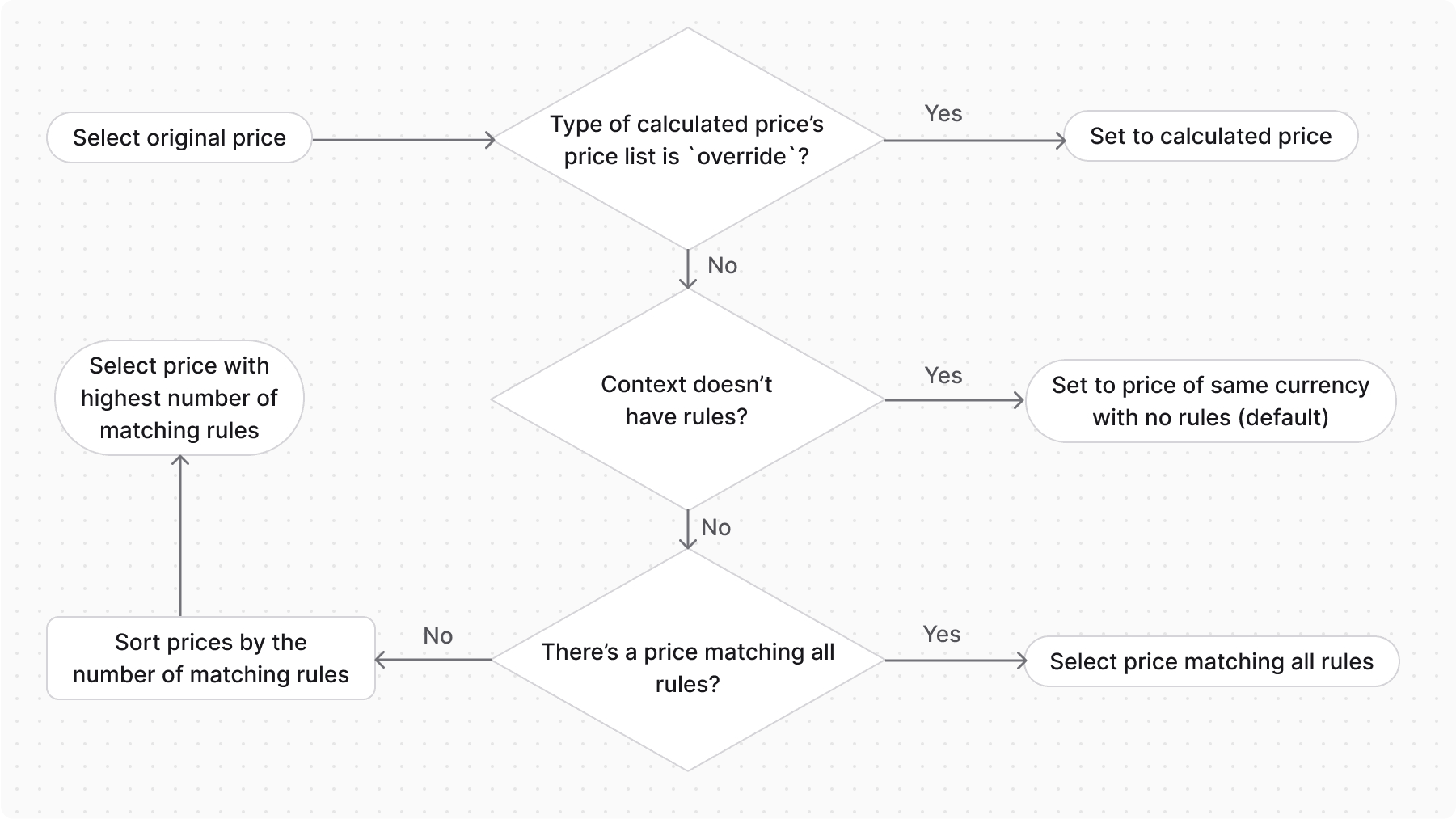
- If the context doesn't have any rules, select the default price (the price without any rules).
- If the context has rules and there's a price that matches all the rules, select that price.
- If the context has rules and there's no price that matches all the rules:
- Find all the prices whose rules match at least one rule in the context.
- Sort the matched prices by the number of matched rules in descending order.
- Select the first price in the sorted list (the one that matches the most rules).
Prices from price lists of type sale are never selected as the original price, since the original price represents the customer's reference (non-sale) price.
When the Original Price is Null#
The original_amount and original_price are null when the calculation finds no original price. This happens when both of the following are true:
- The price set has no default price (a price that doesn't belong to a price list) matching the context.
- Only prices from price lists of type
salematch the context. If a price from a price list of typeoverridematches, it's used as the original price instead.
In this case, the calculated_amount still holds the matching sale price, but there's no reference price to compare it against.
Examples#
Consider the following price set, which has a default price, prices with rules, and tiered pricing:
1const priceSet = await pricingModuleService.createPriceSets({2 prices: [3 // default price4 {5 amount: 5,6 currency_code: "eur",7 rules: {},8 },9 // prices with rules10 {11 amount: 4,12 currency_code: "eur",13 rules: {14 region_id: "reg_123",15 },16 },17 {18 amount: 4.5,19 currency_code: "eur",20 rules: {21 city: "krakow",22 },23 },24 {25 amount: 3.5,26 currency_code: "eur",27 rules: {28 city: "warsaw",29 region_id: "reg_123",30 },31 },32 // tiered price33 {34 amount: 2,35 currency_code: "eur",36 min_quantity: 100,37 },38 ],39})
Default Price Selection#
Calculate Prices with Exact Match#
Calculate Prices with Partial Match#
Tiered Pricing Selection#
Price Selection with Price List#
1const priceList = pricingModuleService.createPriceLists([{2 title: "Summer Price List",3 description: "Price list for summer sale",4 starts_at: Date.parse("01/10/2023").toString(),5 ends_at: Date.parse("31/10/2023").toString(),6 rules: {7 region_id: ['region_123', 'region_456'],8 },9 type: "sale",10 prices: [11 {12 amount: 2,13 currency_code: "eur",14 price_set_id: priceSet.id,15 },16 {17 amount: 1.5,18 currency_code: "usd",19 price_set_id: priceSet.id,20 }21 ],22}]);23 24const price = await pricingModuleService.calculatePrices(25 { id: [priceSet.id] },26 {27 context: {28 currency_code: "eur",29 region_id: "reg_123",30 city: "krakow"31 }32 }33)