Tax Lines in Cart Module
In this document, you’ll learn about tax lines in a cart and how to retrieve tax lines with the Tax Module.
What are Tax Lines?#
A tax line indicates the tax rate of a line item or a shipping method. The LineItemTaxLine data model represents a line item’s tax line, and the ShippingMethodTaxLine data model represents a shipping method’s tax line.

Tax Inclusivity#
By default, the tax amount is calculated by taking the tax rate from the line item or shipping method’s amount, and then adding them to the item/method’s subtotal.
However, line items and shipping methods have an is_tax_inclusive property that, when enabled, indicates that the item or method’s price already includes taxes.
So, instead of calculating the tax rate and adding it to the item/method’s subtotal, it’s calculated as part of the subtotal.
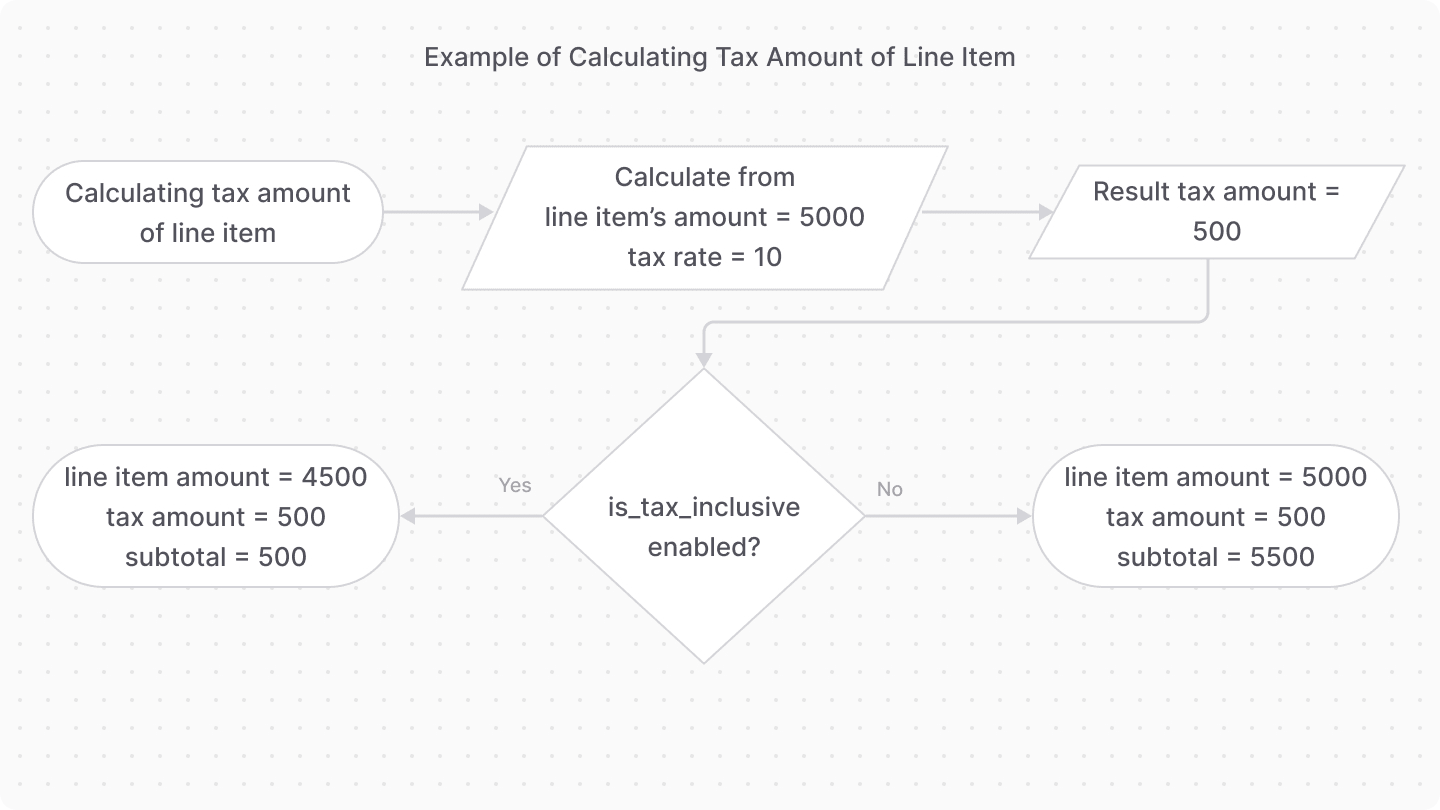
For example, if a line item's amount is 5000, the tax rate is 10, and tax inclusivity is enabled, the tax amount is 10% of 5000, which is 500, making the unit price of the line item 4500.
When Are Tax Lines Recalculated?#
When you use the Cart Module in the Medusa application, Medusa recalculates a cart's tax lines automatically as the customer builds and updates their cart. So, in most cases, you don't need to manually recalculate them.
Whether Medusa recalculates the tax lines depends on the automatic_taxes setting of the cart's region:
- If
automatic_taxesis enabled, Medusa recalculates the affected tax lines automatically when the cart changes. - If
automatic_taxesis disabled, Medusa only calculates tax lines when you send a request to the Calculate Cart Taxes API route.
Tax Lines Require a Shipping Address#
Regardless of the automatic_taxes setting, Medusa only calculates tax lines once the cart's shipping address has a country code. Until you set the shipping address's country, the cart's line items and shipping methods have no tax lines.
Medusa determines the tax rates from the country in the cart's shipping address, not from the list of countries in the cart's region. So, a region with multiple countries doesn't have a default country for tax calculation. Medusa calculates each customer's taxes based on the country they set in their shipping address.
Tax Recalculation by Cart Operation#
The following table explains how each cart operation affects the cart's tax lines when automatic_taxes is enabled:
Operation | Tax behavior |
|---|---|
Add a line item | Medusa calculates the tax lines of the new item. |
Add a shipping method | Medusa calculates the tax lines of the new shipping method. |
Update the cart's region or locale | Medusa recalculates the tax lines of all the cart's items and shipping methods. |
Update a line item's quantity | Medusa doesn't recalculate tax lines. Instead, it derives the new tax amounts from the item's existing tax rates. |
Remove a line item | Medusa doesn't recalculate the tax lines of the cart's other items. |
automatic_taxes is disabled, send a request to the Calculate Cart Taxes API route. This also triggers a fresh calculation from your third-party tax provider, if you use one.Retrieve Tax Lines#
When using the Cart and Tax modules together, you can use the getTaxLines method of the Tax Module’s main service. It retrieves the tax lines for a cart’s line items and shipping methods.
1// retrieve the cart2const cart = await cartModuleService.retrieveCart("cart_123", {3 relations: [4 "items.tax_lines",5 "shipping_methods.tax_lines",6 "shipping_address",7 ],8})9 10// retrieve the tax lines11const taxLines = await taxModuleService.getTaxLines(12 [13 ...(cart.items as TaxableItemDTO[]),14 ...(cart.shipping_methods as TaxableShippingDTO[]),15 ],16 {17 address: {18 ...cart.shipping_address,19 country_code:20 cart.shipping_address.country_code || "us",21 },22 }23)
Then, use the returned tax lines to set the line items and shipping methods’ tax lines:
Customize Tax Context with Hooks#
The tax line workflows (updateTaxLinesWorkflow, upsertTaxLinesWorkflow, and updateOrderTaxLinesWorkflow) expose a setTaxLineContext hook that allows you to add custom context to tax calculations.
This is useful when you need to pass additional information to your tax provider that isn't included in the default cart or order data.
For example, create the file src/workflows/hooks/tax-context.ts with the following content:
1import { updateTaxLinesWorkflow } from "@medusajs/medusa/core-flows"2import { Modules } from "@medusajs/framework/utils"3 4updateTaxLinesWorkflow.hooks.setTaxLineContext(5 async ({ cart, items, shipping_methods }, { container }) => {6 // Add custom logic to determine tax context7 const customerModule = container.resolve(Modules.CUSTOMER)8 const customer = await customerModule.retrieveCustomer(cart.customer_id)9 10 return {11 customer_type: customer.metadata?.type || "regular",12 loyalty_tier: customer.metadata?.loyalty_tier || "bronze",13 special_exemption: customer.metadata?.tax_exempt || false,14 }15 }16)
The returned object is passed as additional_context to the tax provider's getTaxLines method, allowing you to implement custom tax logic based on this context.